



In the era of digital transformation, maintaining 24/7 system uptime is a vital factor for business survival. One of the revolutionary technologies that makes this possible is VMware vMotion. Far more than just a feature, vMotion has completely transformed how system administrators operate data centers, eliminating the concept of “downtime” during hardware maintenance.
What is VMware vMotion?
VMware vMotion is a breakthrough solution that allows the migration of live virtual machines (VMs) between physical servers without service disruption. In the past, hardware maintenance or upgrades required shutting down VMs; however, with vMotion, all connections and processes continue to run smoothly during the migration.
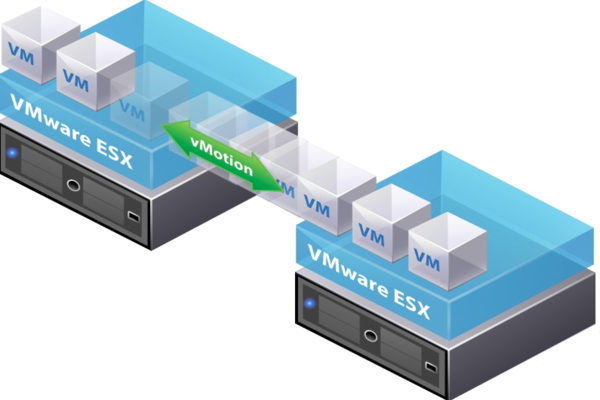
Launched in 2003, this feature has continuously evolved through various vSphere versions. Today, it supports long-distance migrations and cross-cloud platforms, optimizing operational capabilities for modern server systems.
Key Requirements for Running vMotion
To enable VMware vMotion, your infrastructure must meet the following basic conditions:
- Centralized Management: A VMware vCenter Server is required to coordinate and manage the migration process between hosts.
- Network Connectivity: A dedicated vMotion Network with a minimum speed of 1Gbps is necessary to ensure rapid data transfer.
- Shared Storage: All hosts must be connected to a centralized storage system (such as SAN, NAS, or vSAN) to access the virtual machine’s disk files simultaneously.
How VMware vMotion Works
VMware vMotion migrates active virtual machines between hosts without service interruption through a mechanism of memory state transfer and intelligent network handling. The process consists of three main phases:
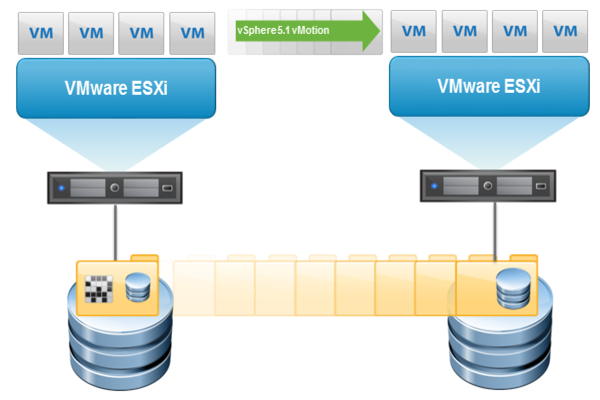
- Memory (RAM) Copying: vMotion transfers active data in RAM from the source host to the destination host without stopping the VM.
- Instantaneous Handover: Once the RAM is synchronized, the VM pauses for a few milliseconds to transfer execution authority to the new host.
- Network Routing: The IP and MAC addresses remain unchanged, and the system notifies the physical switch of the virtual machine’s new location.
Why You Should Use VMware vMotion
Implementing VMware vMotion is a smart strategy to maintain continuous and efficient IT infrastructure:
- Zero Downtime: You can repair or upgrade server components during business hours without shutting down virtual machines, completely eliminating service interruptions.
- Performance Optimization: When a server becomes overloaded, vMotion easily migrates virtual machines to other available hosts to balance the load, ensuring applications always run fast and remain stable.
- Increased Availability: It serves as the foundation for the system to automatically move virtual machines away from hosts showing signs of failure, preventing incidents and keeping data safe.
Pros and Cons of VMware vMotion
Every technology has two sides, and VMware vMotion is no exception. Understanding both its strengths and limitations helps system engineers maintain an objective perspective, allowing them to design infrastructure that best fits the organization’s budget and needs.
Outstanding Advantages of vMotion
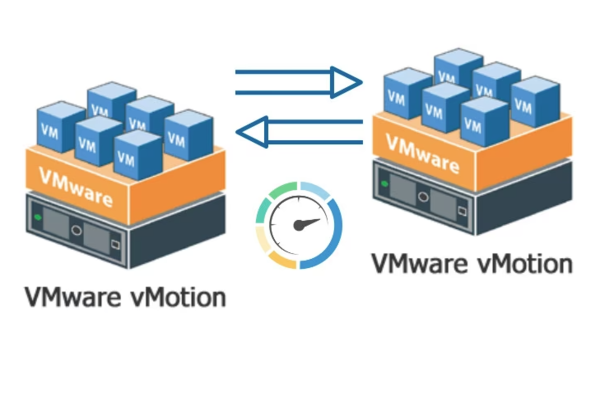
The greatest advantage is flexibility and continuity. It liberates administrators from the constraints of physical hardware. Furthermore, vMotion provides excellent support for upgrading host software (ESXi) without disrupting services, ensuring the system is always updated with the latest security patches.
Disadvantages and Limitations to Consider
The primary drawbacks lie in cost and infrastructure requirements:
- Licensing: vMotion requires a vSphere license at the Standard level or higher, which is a significant investment.
- Network Dependency: If the network connection between hosts is insufficient or experiences high latency, the vMotion process may fail or cause the virtual machine to slow down during the handover.
Comparing vMotion and Storage vMotion
Many people often confuse these two concepts. Here is a breakdown of their differences:
| Feature | VMware vMotion | Storage vMotion |
|---|---|---|
| Migration Object | Active state of the VM (CPU, RAM) | Virtual disk files (VMDK) |
| Component Changed | Changes the Host (Physical Server) | Changes the Datastore (Storage Location) |
| Primary Purpose | Host maintenance, balancing compute resources. | Storage maintenance, disk upgrades, capacity balancing. |
| VM Status | Must be Powered on. | Can be either Powered on or Powered off. |
| Connectivity Requirement | Requires Shared Storage between hosts. | Does not require shared storage (can move between different disk arrays). |
Benefits of Using VMware vMotion
Utilizing VMware vMotion delivers significant value in terms of both economics and operations, helping businesses optimize costs and improve service quality:
- Operational Cost Savings: Allows for consolidating virtual machines onto fewer servers during off-peak hours. This enables the shutdown of redundant hardware, significantly reducing electricity and cooling expenses.
- Ensuring Service Level Agreements (SLA): Maintains 24/7 continuous operation even during maintenance, helping to achieve maximum uptime and preventing financial losses caused by service disruptions.
- Flexible Scalability: Easily move virtual machines to newer, more powerful servers with a simple “drag and drop” action, eliminating the need for application reinstallation or complex reconfigurations.
Real-World Applications of VMware vMotion
VMware vMotion is widely applied across systems of all scales, providing the flexibility to handle various operational scenarios:
- Zero-Downtime Hardware Maintenance: Automatically move virtual machines to another server so administrators can shut down the original host, replace components, or update software without affecting users.
- Distributed Resource Scheduler (DRS): The system automatically migrates VMs to vacant or more powerful servers when it detects an overload, ensuring applications always run smoothly.
- Long-Distance Migration: Supports moving virtual machines between geographically distant data centers for disaster recovery or resource rotation between branches without requiring a shutdown.
Challenges When Deploying VMware vMotion
Despite its power, businesses face certain challenges in ensuring VMware vMotion operates stably. Careful technical preparation will help avoid common errors that could disrupt business processes.
- CPU Compatibility: The source and destination servers must use processors with compatible instruction sets. If using different chip generations (such as Intel vs. AMD), you must configure the Enhanced vMotion Compatibility (EVC) feature to synchronize them.
- Network Bandwidth and Latency: The RAM data transfer process requires a high-speed, stable connection. If the network is slow or congested, the VM may freeze; therefore, using a 10Gbps network and a dedicated VLAN is recommended.
- Shared Storage Systems: To achieve optimal speed, servers should connect to the same storage repository (SAN/NAS). Without shared storage, migrations take significantly longer and consume more system resources.
VMware vMotion is more than just a technical feature; it is the foundation of flexibility in virtualization. By understanding its operation and associated challenges, you can maximize its power to build a robust, “always-on” IT infrastructure.
