



In the era of booming digital technology, network infrastructure plays a vital role for every business. Even a minor network incident can cause severe disruptions, directly affecting productivity and revenue. Therefore, choosing a powerful and comprehensive network monitoring tool is indispensable. PRTG Network Monitor is one of the most trusted solutions by system administrators worldwide today. This article will help you clearly understand what PRTG is, how it works, and why it is so highly evaluated.
What is PRTG Network Monitor?
PRTG Network Monitor is a comprehensive network monitoring software developed by Paessler AG (Germany), launched in 1997 and continuously improved over decades. It is one of the most popular IT infrastructure monitoring tools in the world, trusted by hundreds of thousands of administrators in over 170 countries. Whether you are a small business or a large corporation, PRTG is capable of meeting monitoring needs from simple to complex.
How Does PRTG Work?
PRTG operates based on a sensor mechanism-each sensor is an independent monitoring unit responsible for tracking a specific parameter on a device or service. For example, one sensor can monitor bandwidth traffic on a switch port, another sensor tracks the disk capacity of a server, and another checks the response time of a website. PRTG continuously collects data from these sensors, processes it, and presents it on an intuitive dashboard interface, helping administrators grasp the entire system status through a single screen.
Which Protocols Does PRTG Support?
A major strength of PRTG is its ability to support a wide variety of popular monitoring protocols in the IT industry. The software comes with built-in support for SNMP (Simple Network Management Protocol), WMI (Windows Management Instrumentation), NetFlow, sFlow, IPFIX, SSH, Ping, HTTP/HTTPS, REST API, SOAP, and many other protocols. Thanks to this, PRTG can monitor almost every type of device and service in modern IT infrastructure, from routers, switches, firewalls, physical servers, and virtual servers to cloud applications and SaaS services.
Key Features of PRTG Network Monitor
PRTG is not merely a “ping and check” tool-it is a comprehensive monitoring platform with hundreds of features designed to serve the practical needs of IT operations teams. From automatic device discovery and smart alerting to detailed reporting, PRTG provides everything needed to manage infrastructure proactively and efficiently. Below are the most prominent features highly evaluated by users.
Intuitive Dashboard and User Interface
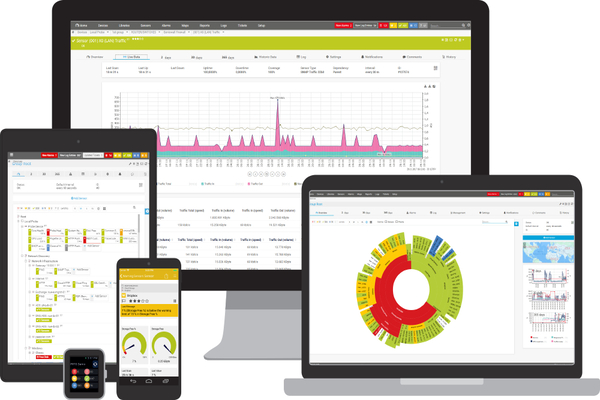
PRTG provides a modern web interface that can be accessed from any browser without installing additional client-side software. The dashboard is flexibly designed, allowing administrators to freely customize it according to their needs-dragging and dropping widgets, charts, network maps, and device status tables. Notably, PRTG’s maps feature allows the creation of visual network diagrams with real-time, color-coded status icons, helping operations teams quickly identify incidents at a glance.
Smart Alerting System
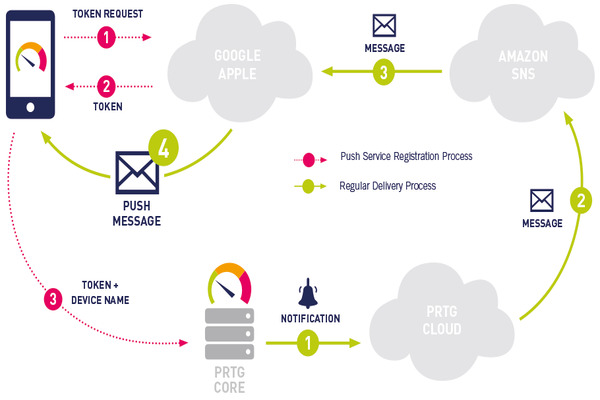
One of PRTG’s outstanding strengths is its multi-channel and flexible alerting system. When a sensor detects an anomaly-such as bandwidth exceeding thresholds, a server losing connection, or disk capacity running low-PRTG immediately sends notifications via email, SMS, push notifications (via the PRTG mobile app), Slack, Microsoft Teams, or even triggers webhooks to integrate with other systems. Users can also set up alert schedules to avoid receiving notifications during planned maintenance windows.
Reporting and Historical Data Analysis
PRTG stores all monitoring data over time, allowing administrators to analyze trends and system performance history. The built-in reporting system supports generating scheduled automatic reports-daily, weekly, monthly-and exporting them to multiple formats such as PDF, HTML, or CSV. This feature is particularly useful when presenting infrastructure status to management or serving system auditing purposes.
Over 250 Built-In Sensor Types
PRTG comes with a built-in library of over 250 sensor types, including sensors for monitoring network bandwidth, server CPU and RAM, databases (SQL Server, MySQL, Oracle), cloud services (AWS, Azure, Google Cloud), enterprise applications (Exchange, SharePoint, vCenter), and many more. Additionally, PRTG supports custom sensors via PowerShell, Python, or EXE scripts, allowing users to build their own sensors based on the specific needs of their organization.
Benefits of Using PRTG Network Monitor
Deploying PRTG brings not only infrastructure visibility but also helps businesses shift from a reactive to a proactive operational style. Instead of waiting for users to report issues, the IT team will be aware of problems before they affect business operations. Here are the specific benefits that PRTG brings to businesses:
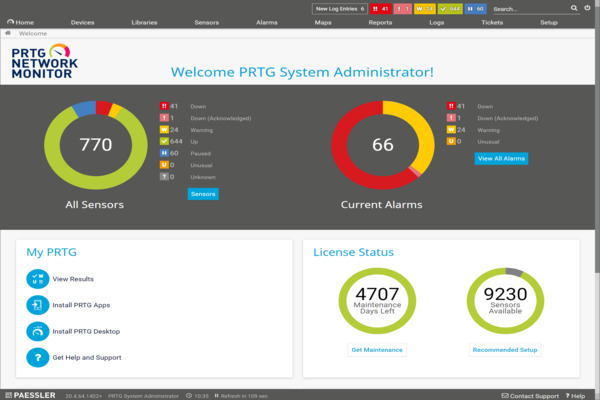
- Early Incident Detection and Downtime Reduction: PRTG continuously monitors infrastructure 24/7 and issues alerts as soon as anomalous signs are detected. This helps the IT team resolve problems before they escalate into serious incidents, thereby minimizing system downtime-a factor that directly affects business productivity and revenue.
- Saving Administration Time: Thanks to its centralized interface and high automation capabilities, PRTG saves administrators significant time compared to manually checking each device. The auto-discovery feature automatically scans and adds new devices to the monitoring system, while automated reports eliminate periodic data compilation work. As a result, the IT team can focus on strategic tasks instead of repetitive operational chores.
- Supporting Multi-Platform and Hybrid Environments: In the context of modern enterprises using a combination of on-premise, private cloud, and public cloud infrastructure, PRTG stands out with its ability to unify monitoring across all environments. Whether your infrastructure runs on Windows Server, Linux, VMware, Hyper-V, or AWS/Azure services, PRTG can integrate and provide a consistent overview from a single interface.
- Flexible Scalability: PRTG can be deployed for networks with dozens of devices up to tens of thousands of devices spread across multiple locations. Its distributed monitoring architecture with Remote Probes allows extending the monitoring scope to branch offices and remote data centers without investing in additional complex infrastructure.
How to Install and Use PRTG Network Monitor
PRTG is designed to be easily deployed and put into use, even for those without extensive experience in advanced monitoring tools. The installation process is streamlined to the maximum, and the clear setup wizard helps users get started quickly. Below is an overview of the steps to deploy PRTG in an enterprise environment.
System Requirements and Download
The PRTG Core Server runs on Windows Server (recommended from Windows Server 2016 or higher) or Windows 10/11 with a minimum configuration of 2GB RAM and 2 CPU cores; however, practical environments should be more heavily equipped depending on the monitoring scale. You can download a 30-day free trial directly from Paessler’s homepage at [paessler.com/prtg](https://paessler.com/prtg). The installation process is as simple as installing regular Windows software-run the installer file, select the installation folder, and complete it within a few minutes.
Initial Setup and Auto-Discovery
After installation, PRTG opens the web interface right in your browser (usually at http://localhost). The first step is to configure Auto-Discovery-a feature that automatically scans the local network based on the IP range you provide, detects existing devices, and automatically adds the appropriate sensors. Within just a few minutes, PRTG can build an overview picture of the entire network infrastructure without requiring you to manually configure each device.
Customizing Sensors and Alert Thresholds
Once Auto-Discovery is complete, the next step is to fine-tune the sensors according to specific needs. You can set alert thresholds for each sensor-for example, alerting when CPU usage exceeds 85%, or when bandwidth reaches 90% of the line capacity. PRTG supports three status levels: OK (green), Warning (yellow), and Error (red), helping to visually categorize troubleshooting priorities. Adding new sensors is also very simple through a drag-and-drop interface or built-in templates.
Mobile Device Access
PRTG provides a free mobile application for both iOS and Android, allowing administrators to track system status and receive push notification alerts anytime, anywhere. The mobile app interface fully displays sensor statuses, historical charts, and allows performing basic management operations right on your phone.
Is PRTG Network Monitor Free?
This is a question of interest to many users, especially organizations looking for a monitoring solution with a limited budget. PRTG applies a flexible licensing model, meeting the needs of many different business scales-from small to large. Below are the details of PRTG’s licensing options.
Free and Trial Versions
PRTG provides a 30-day free trial with full features and an unlimited number of sensors. After 30 days, if you have not purchased a license, the system will automatically switch to PRTG Free mode-allowing free use but limited to 100 sensors. With 100 sensors, you can monitor about 10–20 devices at a basic level, which is suitable for very small businesses or for learning and testing purposes.
Paid License Packages
PRTG licensing is calculated based on the number of sensors used, with popular packages including 500, 1,000, 2,500, 5,000, and XL1 (unlimited sensors). The perpetual license model allows you to pay once and use it indefinitely, accompanied by an annual Maintenance package to receive updates and technical support. Additionally, Paessler also provides a more flexible annual subscription model for organizations that want to control costs phase by phase.
Is PRTG Suitable for Small and Medium Enterprises (SMEs)?
Absolutely. PRTG’s 500-sensor package has a reasonable starting price and is sufficient to monitor the infrastructure of a medium-sized enterprise with dozens to over 100 devices. As the organization grows, you only need to upgrade to a package with more sensors without changing the platform or relearning a new tool. This is precisely one of the reasons why PRTG is favored: low initial investment cost and high scalability.
PRTG Network Monitor fully deserves the title of one of the best network monitoring tools available today. With an intuitive interface, a rich library of sensors, flexible multi-channel alerting, and powerful scalability, PRTG helps IT teams proactively control the entire infrastructure-from network devices, servers, and applications to cloud services-through a single interface. Whether you are operating a network for a small office or a multinational enterprise, PRTG has a suitable option. Start with the 30-day free trial to experience the full power of this tool before making an investment decision.
