


In today’s modern IT world, ensuring that systems run stably and continuously is a matter of survival for every business. A single minor incident left undetected can result in hours of service disruption, lost revenue, and a breakdown of customer trust. That is why system monitoring tools are becoming increasingly indispensable – and Nagios is one of the most well-known solutions in this field.
What Is Nagios?
Nagios is an open-source system and network monitoring platform, first developed in 1999 by Ethan Galstad under the name NetSaint. In 2002, the software was renamed Nagios – an acronym for “Nagios Ain’t Gonna Insist On Sainthood” – and quickly became the gold standard in IT infrastructure monitoring.
At its core, Nagios is an alerting and tracking system that allows system administrators to monitor the status of servers, services, applications, and the entire network infrastructure in real time. When an incident occurs – such as a server going down, network bandwidth becoming overloaded, or a service failing to respond – Nagios immediately sends alerts to the technical team via email, SMS, or other notification channels.
Nagios comes in two main versions. Nagios Core is completely free and open-source, providing essential monitoring features and continuously enriched by community-contributed plugins from around the world. Nagios XI is the commercial edition, featuring an advanced graphical interface, enterprise support, and more convenient configuration capabilities. Regardless of version, Nagios maintains its reputation as a reliable, flexible, and highly scalable monitoring tool.
Advantages and Disadvantages of Nagios
Before deciding to deploy any tool into a system, carefully weighing its strengths and weaknesses is essential. Nagios is no exception – it offers many outstanding advantages while also carrying certain limitations that technical teams should be fully aware of.
Key Advantages of Nagios
Open-source and free: Nagios Core requires no licensing fees, making it well-suited for organizations with limited budgets.
- Rich plugin ecosystem: With over 5,000 community-developed plugins, Nagios can monitor virtually any type of device, service, or application.
- High reliability: Nagios has been proven over decades of real-world enterprise use across the globe.
- Flexible and scalable: The system can scale to monitor anywhere from a few dozen to thousands of servers depending on requirements.
- Multi-channel alerting: Supports notifications via email, SMS, Slack, PagerDuty, and many other platforms.
Disadvantages to Be Aware Of
- Complex configuration: Nagios Core requires manual configuration through text files, demanding strong technical skills and significant time during initial setup.
- Outdated user interface: Nagios Core’s default web interface is fairly basic and lacks the intuitiveness of modern tools like Grafana or Zabbix.
- No built-in distributed monitoring support: To monitor multiple locations, users need to configure additional supplementary solutions.
- Ongoing maintenance costs: While the core version is free, the personnel costs required to operate, maintain, and update the Nagios system can be considerable.
How Does Nagios Work?
Nagios operates on a periodic check model, in which the system continuously polls the status of monitored objects and triggers alerts upon detecting anomalies. To better understand this, the workflow can be broken down into three main stages.

Collecting Information
The process begins with Nagios gathering data from servers and network devices within the system. Nagios uses two primary methods to accomplish this. The first is Active Check, where the Nagios server proactively connects to monitored targets on a predefined schedule to retrieve data. The second is Passive Check, where agents installed on remote servers – typically NRPE (Nagios Remote Plugin Executor) – collect local information themselves and send it back to the central Nagios server. Collected data includes CPU usage, RAM, disk capacity, service status, network latency, and many other key system metrics.
Transferring Information
Once data is collected, the next step is forwarding it to the central Nagios server for processing. For active checks, data is returned immediately after each check request is sent by Nagios. For passive checks via NSCA (Nagios Service Check Acceptor), agents proactively push check results to the central server. This entire process runs on a pre-programmed cycle – typically every one to five minutes – to ensure data is always continuously and promptly updated.
Delivering Results
The final stage is Nagios processing and delivering results to the administrator. After receiving the data, Nagios analyzes and compares it against pre-configured thresholds. If a value exceeds the Warning threshold or the Critical threshold, Nagios immediately activates its notification mechanism. Results are delivered to users through multiple channels such as email, SMS, push notifications, or integrations with incident management platforms like PagerDuty. At the same time, the complete history of alerts and system states is stored in a database for reporting and future analysis.
Nagios Architecture
Nagios is built on a clear client-server model, allowing flexible deployment across systems of varying scales.
- The Nagios Server is the central component, responsible for scheduling checks, processing results, managing alerts, and providing the web interface for administrators. This server is typically installed on a Linux operating system and runs the Nagios daemon continuously.
- Plugins are the second critical component of the Nagios architecture. Each plugin is a small script or program that performs a specific check task – for example, checking ping, checking HTTP, or checking disk capacity. Nagios does not perform checks itself but delegates entirely to plugins, which creates extremely high flexibility since users can write their own plugins to meet specific needs.
- NRPE (Nagios Remote Plugin Executor) is an agent installed on remote servers, allowing the Nagios Server to execute plugins directly on those machines and retrieve the results. This is the ideal solution for monitoring internal metrics that cannot be accessed remotely via standard network protocols.
- NSCA (Nagios Service Check Acceptor) supports the passive check model, allowing external systems to proactively push check results into the Nagios Server rather than waiting for the server to fetch them.
Notable Features of Nagios
Nagios is not merely a simple monitoring tool – it is a complete ecosystem with many features designed to meet the needs of organizations of all sizes. Below are the most outstanding features that have helped Nagios maintain its leading position for over two decades.
Open-Source Community Support
One of Nagios’s greatest strengths is the massive global community of users and developers behind it. Nagios Exchange – the official plugin repository – currently holds over 5,000 community-contributed plugins, covering every type of device and service from Linux/Windows servers, Cisco network equipment, and MySQL/PostgreSQL databases to cloud services like AWS and Azure. In addition, an extensive system of forums, wikis, and documentation makes it easy for users to find solutions to any problem they encounter. Community support not only reduces development costs but also ensures Nagios is continuously updated and improved in line with the latest technology trends.
Full Infrastructure Monitoring
Nagios provides comprehensive monitoring across multiple layers of IT infrastructure, from physical hardware to software and network services. The system can simultaneously track thousands of servers and devices, including physical servers, virtual machines, Docker containers, network devices (routers, switches, firewalls), printers, and even IoT devices. With the ability to check diverse protocols such as HTTP/HTTPS, FTP, SSH, SMTP, DNS, POP3, IMAP, and many others, Nagios ensures there are no blind spots in the system. Furthermore, distributed monitoring capabilities allow multiple Nagios servers to be deployed to monitor offices or data centers across different geographic locations.
Scheduled Maintenance Planning
An often-overlooked but extremely useful feature of Nagios is its ability to support maintenance and upgrade planning. Through Scheduled Downtime mode, administrators can schedule maintenance windows for individual servers or services, during which Nagios temporarily suspends alerts to avoid unnecessary noise. Continuously collected historical performance data helps the technical team identify declining trends before incidents occur, enabling proactive and data-driven planning for hardware upgrades or capacity expansion. Nagios XI’s advanced reporting features also provide visual charts and dashboards, helping management make infrastructure investment decisions based on real data.
How to Install and Configure Nagios
To install Nagios Core on a Linux system (CentOS/RHEL or Ubuntu), administrators need to carry out the following steps in sequence:
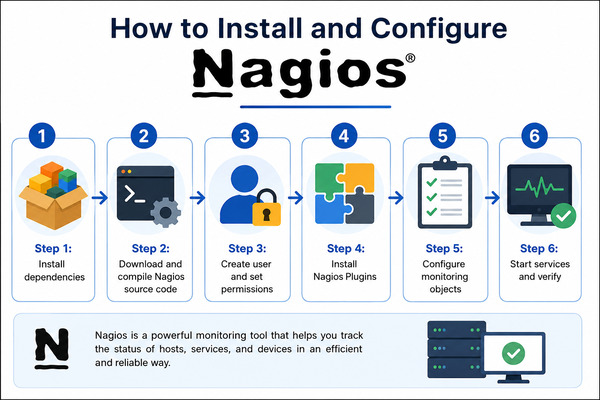
Step 1: Install Dependencies
First, install the necessary libraries and tools using the operating system’s package manager. On CentOS/RHEL, use the command yum install -y gcc glibc glibc-common wget unzip httpd php gd gd-devel. On Ubuntu/Debian, the equivalent is apt install -y autoconf gcc libc6 make wget unzip apache2 php libapache2-mod-php libgd-dev.
Step 2: Download and Compile the Nagios Source Code
Download the latest Nagios Core source code from nagios.org, extract it, and compile from source using the commands ./configure, make all, and make install. This process generates the Nagios binary and installs the standard directory structure under /usr/local/nagios/.
Step 3: Create a User and Set Permissions
Create a nagios system account and add it to the www-data (or apache) group so that Apache can run Nagios CGI scripts. Set a password for the web admin account using the command htpasswd -c /usr/local/nagios/etc/htpasswd.users nagiosadmin.
Step 4: Install Nagios Plugins
Download and compile the official plugin package from the nagios-plugins repository. These plugins provide hundreds of ready-to-use check commands such as check_ping, check_http, check_disk, and check_cpu.
Step 5: Configure Monitored Objects
This is the most important step. Nagios configuration files are located in /usr/local/nagios/etc/ and are written in a specific format. Administrators need to define: Host (servers to be monitored), Service (services on each host), Contact (alert recipients), Timeperiod (monitoring and notification schedules), and Command (which plugin the check command uses).
Step 6: Start the Service and Verify
Once configuration is complete, run the syntax check command /usr/local/nagios/bin/nagios -v /usr/local/nagios/etc/nagios.cfg to catch any errors before starting. Then activate the service with systemctl start nagios and systemctl enable nagios. Access the web interface at http://your-server-ip/nagios to begin monitoring your system.
Nagios has continuously proven its value over more than 25 years of development, becoming an indispensable tool in the toolkit of every professional system administrator. Whether you are managing a small infrastructure or a large-scale enterprise system, Nagios can provide comprehensive, reliable, and flexible monitoring to ensure your systems always run stably and efficiently.
