


In an era of increasingly complex IT infrastructure, monitoring and ensuring the stability of network systems is a critical factor for every organization. Zabbix has emerged as one of the leading monitoring solutions, trusted by millions of organizations worldwide. This article will help you understand what Zabbix is, how it works, and why it has become the preferred choice in the field of IT infrastructure monitoring.
What is Zabbix?
Zabbix is an open-source network and system monitoring platform developed by Alexei Vladishev in 1998 and officially released to the public in 2001. The software is designed to comprehensively monitor the status of servers, network devices, applications, cloud services, and many other infrastructure components in real time.
Zabbix operates on a model of continuously collecting data from monitored sources, then analyzing and displaying information in the form of graphs and intuitive dashboards. When an anomaly or incident is detected, the system triggers an immediate alert so that the technical team can respond in a timely manner. It is free software distributed under the GPL (General Public License), allowing organizations to deploy and customize it without incurring any licensing costs.
Zabbix Architecture
To understand how Zabbix operates effectively, it is important to understand the core architecture of the system. Zabbix is built on a distributed model consisting of multiple components that work closely together to ensure scalability and high reliability.
The Zabbix architecture includes the following main components:
- Zabbix Server: This is the central brain, responsible for collecting data, processing information, triggering alerts, and storing results. All data from agents and proxies is sent here for analysis.
- Zabbix Agent: A lightweight piece of software installed on the servers or devices that need to be monitored. The agent collects local information (CPU, RAM, disk, processes, etc.) and sends it to the Zabbix Server at regular intervals.
- Zabbix Proxy: Acts as an intermediary in distributed environments, helping to collect data from devices on sub-networks or geographically remote locations, then forwarding it to the Zabbix Server. This helps reduce the load on the main server.
- Zabbix Web Frontend: A web interface written in PHP that allows administrators to configure, view reports and graphs, and manage the entire monitoring system through a browser.
- Database: Zabbix uses a database (MySQL, PostgreSQL, Oracle, SQLite) to store configurations, historical data, and monitoring results.
Advantages and Disadvantages of Zabbix
Like any technology tool, Zabbix has notable strengths but also some limitations that users should consider before deployment. Understanding both sides will help you make decisions appropriate to the scale and needs of your organization.
Advantages of Zabbix:
- Free and open-source: No licensing costs, a large and continuously improving community.
- Comprehensive monitoring: Supports monitoring of physical servers, virtual machines, Docker containers, cloud services, and IoT devices.
- High scalability: Capable of monitoring tens of thousands of devices within a single system.
- Strong customizability: Supports custom-defined templates, triggers, dashboards, and incident response scripts.
- Agent-independent: Zabbix supports agentless monitoring via SNMP, ICMP, JMX, SSH, and Telnet.
Disadvantages of Zabbix:
- Complex configuration: The learning curve is relatively steep, especially for beginners.
- Outdated interface: Compared to newer tools like Grafana or Datadog, Zabbix’s default interface is somewhat old and less user-friendly.
- Resource consumption: When monitoring large systems, the database can grow very rapidly, requiring a solid data management strategy.
What Does Zabbix Do?
Zabbix is far more than a simple “ping” tool to check whether a device is online. It is a versatile monitoring platform capable of observing deep into every layer of IT infrastructure. Below are the two core functions that Zabbix performs exceptionally well in real enterprise environments.
Comprehensive System Monitoring
Zabbix is capable of monitoring the entire infrastructure from hardware to software, from physical servers to virtualized and cloud environments. For each monitored server, Zabbix continuously tracks key metrics such as CPU usage, RAM, disk space, I/O read/write speed, the status of running processes, and system uptime.
In addition, Zabbix supports monitoring of applications such as web servers (Apache, Nginx), databases (MySQL, PostgreSQL), mail services, DNS, and many other types of services. Through a reusable template mechanism, administrators can apply a consistent set of monitoring rules to hundreds of servers at once without manually configuring each device.
Network Traffic Analysis
One of Zabbix’s standout strengths is its ability to perform detailed network traffic analysis through support for the SNMP (Simple Network Management Protocol) and NetFlow protocols. Zabbix can collect data from switches, routers, firewalls, and other network devices to monitor bandwidth, packet error rates, latency, and the status of network ports.
For organizations with complex network infrastructure, Zabbix helps administrators quickly identify bandwidth bottlenecks and detect abnormal traffic that may indicate a DDoS attack or a malware-infected device. Traffic data is displayed visually in real time, enabling well-informed decisions for infrastructure optimization.
Core Features of Zabbix
Zabbix integrates a rich and complete set of features, meeting the monitoring needs of organizations from small businesses to large enterprises. Below are the core functions that make up the power of this platform, helping IT teams operate systems stably and proactively address incidents before they affect end users.
Problem Detection
Zabbix uses a threshold-based trigger system to intelligently detect incidents. Administrators define conditions such as “CPU exceeds 90% for 5 consecutive minutes” or “web service is not responding” – when the condition is met, Zabbix immediately records the incident and classifies its severity level (Information, Warning, Average, High, Disaster).
The system also supports anomaly detection based on baselines, meaning Zabbix learns the normal behavior of a system over a specific time period and alerts when there is a significant deviation from that baseline, even before an absolute threshold is breached.
Notification & Remediation
When an incident is detected, Zabbix immediately activates a multi-channel notification system including email, SMS, Slack, Telegram, PagerDuty, and many other platforms via webhooks. Administrators can configure on-call schedules to ensure the right person receives the alert at the right time, avoiding notification overload.
Notably, Zabbix supports an auto-remediation feature through Remote Commands. When a trigger fires, the system can automatically run scripts to restart a service, clear a full log file, or perform predefined corrective actions without requiring manual intervention from an engineer.
Visualization
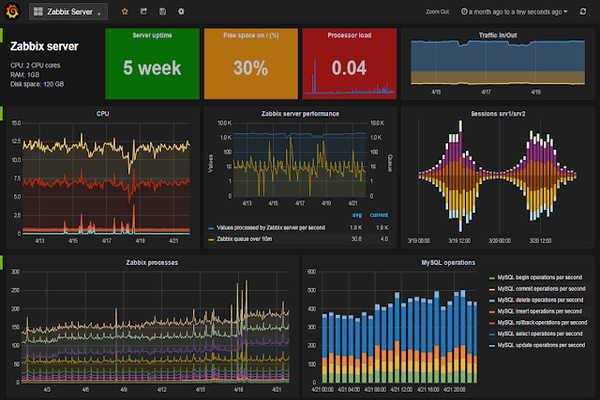
Zabbix provides a variety of powerful data visualization tools. Customizable dashboards allow users to build monitoring interfaces tailored to each role – from a high-level overview for management to detailed monitoring panels for system engineers. Widgets such as real-time graphs, network maps, heatmaps, and pie charts are all available and easy to configure.
Zabbix also supports integration with Grafana – the well-known visualization tool – through an official plugin, allowing users to leverage Grafana’s richer and more professional graphing capabilities while still using Zabbix as the data source.
Effortless Deployment
Although advanced configuration can be complex, Zabbix is designed so that the initial deployment process is quick. The system supports installation on many popular platforms such as RHEL, CentOS, Ubuntu, and Debian, and also provides official Docker images for container deployment. The rich template library on Zabbix Share allows users to download and immediately apply monitoring configuration templates for hundreds of popular devices and applications.
Zabbix also supports automated configuration through YAML files and integrates with configuration management tools such as Ansible, Puppet, and Chef – helping DevOps teams automate the deployment process within CI/CD pipelines.
Zabbix API
Zabbix provides a Zabbix API based on the JSON-RPC protocol, allowing developers to integrate Zabbix into existing systems and workflows. Through the API, users can perform almost any management operation, such as creating hosts, configuring triggers, querying historical data, managing users, and automating daily tasks.
This API is particularly useful when integrating Zabbix with ITSM systems (such as ServiceNow or Jira), internal analytics tools, or building custom monitoring applications. Many third-party client libraries for Python, Go, Ruby, and other languages have also been developed to simplify interaction with the Zabbix API.
Metric Collection
Zabbix supports a wide range of flexible data collection methods, suitable for all types of devices and environments. In addition to the traditional Zabbix Agent, the system also supports collection via SNMP, IPMI (for server hardware), JMX (for Java applications), SSH/Telnet, HTTP/HTTPS (for APIs and web services), and even data from message queues like Kafka.
Zabbix also allows collection of log files and real-time monitoring of log content, helping to quickly detect application errors. The calculated items and dependent items features allow complex metrics to be computed from collected data without requiring additional configuration on the agent side.
Auto-Discovery
One of Zabbix’s most time-saving features is Auto-Discovery – the ability to automatically scan the network and detect new devices and services. Administrators simply define the IP range and discovery rules, and Zabbix will automatically add new hosts, apply the appropriate templates, and begin monitoring without any manual intervention.
In addition, the Low-Level Discovery (LLD) feature automatically detects dynamic components within a device – such as filesystems, network interfaces, CPU cores, or database instances – and then creates corresponding monitoring items and triggers for each component. This is especially valuable in cloud or container environments where resources are continuously created and deleted.
Zabbix is a powerful, flexible, and completely free network and system monitoring solution. With its distributed architecture, rich feature set, and large supporting community, Zabbix is well deserving of its place as the top choice for organizations that want comprehensive control over their IT infrastructure without relying on the cost of commercial software licenses.
