



In the digital age, data is often compared to a company’s “oil.” However, determining where to store this oil—while ensuring both high performance and absolute security—remains a complex challenge. Private Cloud emerges as a perfect solution, combining the flexible power of cloud computing with the security of dedicated infrastructure. This article will delve into every aspect of the private cloud to help you understand why it is the top choice for organizations that prioritize privacy.
What is Private Cloud?
Private Cloud is a cloud computing model in which all hardware and software resources are dedicated exclusively to a single customer. Unlike Public Cloud, where you share infrastructure with multiple other users, Private Cloud creates an isolated environment, typically residing behind a corporate firewall.
Essentially, Private Cloud provides benefits similar to Public Cloud—including self-service, scalability, and flexibility—but with a higher degree of control and customization. It is the ideal solution for enterprises with stringent regulatory compliance requirements or those possessing sensitive data that demands rigorous protection.
Components of a Private Cloud
For a Private Cloud system to operate smoothly and deliver the expected efficiency, it is more than just a collection of physical servers. Its structure is built upon a tight integration between powerful hardware and intelligent software layers, comprising three core components:
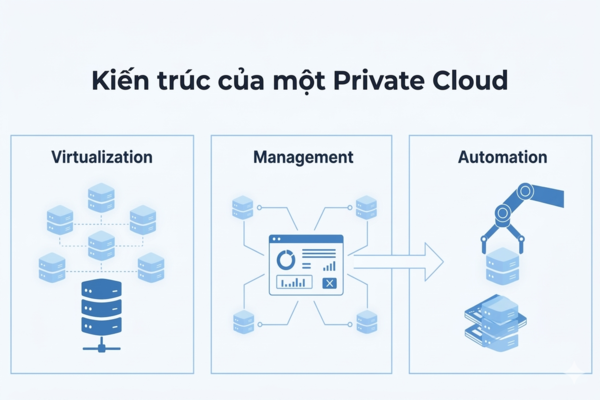
Virtualization
Virtualization is the “soul” of any cloud system. This technology allows physical resources (CPU, RAM, hard drives) to be abstracted into Virtual Machines (VMs). Through virtualization, businesses can run multiple operating systems and applications on the same physical device, maximizing hardware performance and minimizing waste.
Management Software
If virtualization is the engine, management software is the steering wheel. This layer provides a centralized interface for administrators to monitor traffic, allocate resources, and control access. It enables users to spin up or shut down services with just a few clicks, without needing physical intervention at the server rack.
Automation
Automation eliminates repetitive manual tasks. Within a Private Cloud, tasks such as data backups, resource scaling during overloads, or security patching are pre-programmed. This not only reduces human error but also allows the system to react instantly to market fluctuations.
Private Cloud Models
Depending on their usage needs and the management capabilities of their technical teams, businesses can choose to deploy Private Cloud through different service models. The two most common models today are IaaS and PaaS, each serving a distinct strategic purpose.
IaaS – Infrastructure as a Service
IaaS provides the most fundamental resources, such as virtual servers, networks, and storage. With IaaS, enterprises have the highest level of control over the operating system and the applications installed on top. This is an excellent choice for companies looking to migrate traditional infrastructure to the cloud without wanting to change too much of their existing application architecture.
PaaS – Platform as a Service
PaaS provides a complete environment for developers to build, test, and deploy applications. Businesses do not need to concern themselves with managing the underlying servers or operating systems. This model helps shorten the Time-to-Market, making it highly suitable for tech companies or software development departments (DevOps).
Pros and Cons of Private Cloud
Every technology has two sides, and Private Cloud is no exception. Weighing the outstanding benefits against the cost challenges is essential before making an investment decision.
Advantages:
- Absolute Security: Since resources are not shared with anyone else, the risk of attacks from “neighbors” (noisy neighbor effect) is zero.
- Flexible Customization: Enterprises have full authority to decide on hardware and software configurations to suit their specific workflow requirements.
- Regulatory Compliance: It easily meets strict standards such as HIPAA, GDPR, or specific banking data regulations.
Disadvantages:
- High Initial Cost: Requires significant investment in hardware and software licensing.
- Management Responsibility: Businesses need a highly skilled IT team to operate and maintain the system.
Common Types of Private Cloud
In practice, there is no single template for a Private Cloud. Depending on the server location and the managing entity, it can be classified into the following forms to help businesses choose based on their budget and operational capacity.
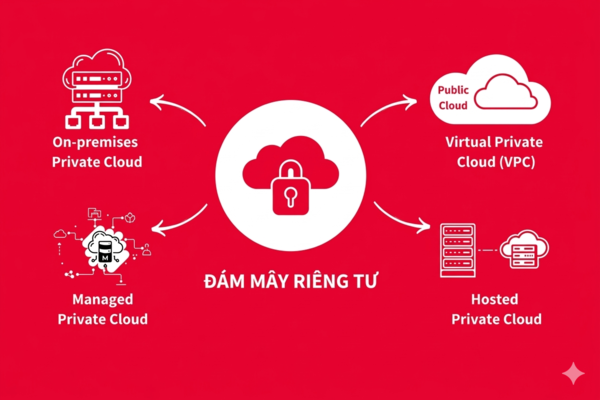
On-premises Private Cloud
This is the most traditional form, where the entire server system is located right at the enterprise’s own Data Center. You maintain 100% control from the physical layer to the application layer. However, you are also responsible for power, cooling, and physical security.
Hosted Private Cloud
With this model, the servers remain dedicated exclusively to you but are housed at a service provider’s data center. The provider handles the physical infrastructure, while you retain remote management rights over your cloud resources.
Managed Private Cloud
This is a “turnkey” solution. The provider not only leases the infrastructure but also takes over the management, updates, and maintenance of the system. This is an ideal choice for businesses that want to use a Private Cloud but lack an in-depth in-house IT team.
Virtual Private Cloud (VPC)
A VPC is a strictly secured, private partition located within a Public Cloud infrastructure. It uses technologies such as Virtual Private Networks (VPN) and Virtual LANs (VLAN) to create logical isolation, providing the experience of a private cloud at a more optimized cost.
When Should a Business Choose Private Cloud?
While Public Cloud is highly convenient, Private Cloud remains a “vital” choice in the following scenarios:
- Banking and Finance Sector: Where customer data security is the number one priority.
- Large Corporations: Organizations with massive and stable resource needs; in the long run, using a Private Cloud can be more cost-effective than renting Public Cloud services.
- Healthcare and Government: Entities that must comply with legal regulations regarding data sovereignty or storage on isolated systems.
- Low Latency Requirements: When applications need to process data extremely fast and the public Internet connection cannot meet the performance demands.
Guide to Setting Up a Private Cloud
Deploying a Private Cloud system is a complex process that requires thorough preparation. To ensure the system operates stably and sustainably, you should follow the standard 7-step roadmap below.
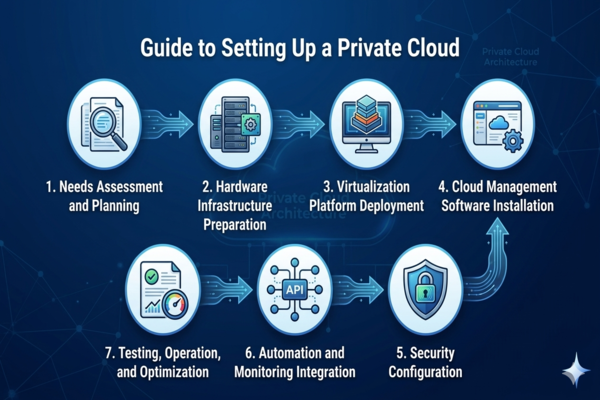
Step 1: Needs Assessment and Planning
Clearly define your goals: How much storage capacity do you need? What is the projected number of virtual machines? What is the maximum budget? Detailed planning helps you avoid resource waste and forecast future scalability.
Step 2: Hardware Infrastructure Preparation
Select servers, storage devices, and networking equipment (Switches, Firewalls) that are compatible with each other. Ensure the server room environment meets standards for temperature, humidity, and Uninterruptible Power Supply (UPS).
Step 3: Virtualization Platform Deployment
Install Hypervisor software (such as VMware vSphere, Microsoft Hyper-V, or OpenStack). This layer transforms physical servers into a shared “pool” of resources ready for allocation.
Step 4: Cloud Management Software Installation
Set up orchestration tools so users can interact with the system. This is where you define service packages, assign user permissions, and establish resource quotas for each department.
Step 5: Security Configuration
This is the most critical step. Configure firewalls, set up Intrusion Detection/Prevention Systems (IDS/IPS), encrypt data, and establish Multi-Factor Authentication (MFA) policies to ensure the system is impenetrable.
Step 6: Automation and Monitoring Integration
Install performance monitoring tools to track system health 24/7. Set up automated scripts for backups and Disaster Recovery (DR).
Step 7: Testing, Operation, and Optimization
Perform load testing to ensure everything runs according to design. Once operational, regularly update software and optimize resources based on actual usage reports.
Frequently Asked Questions about Private Cloud
- Is Private Cloud more secure than Public Cloud? Theoretically, yes, because it is completely isolated. However, security also depends on your configuration and management. A well-managed Public Cloud can still be more secure than a neglected Private Cloud.
- What are the maintenance costs of a Private Cloud? These include electricity costs, annual software licensing fees, operational personnel costs, and periodic hardware upgrade costs (typically every 3–5 years).
- Can I combine Private Cloud with Public Cloud? Absolutely. This model is called Hybrid Cloud. You can keep sensitive data on the Private Cloud and run standard web applications on the Public Cloud to optimize costs.
Private Cloud is not just a technological solution; it is a strategic investment in the security and sustainable development of an enterprise. With total control over your data, this is the solid foundation for confidently entering the Industry 4.0 revolution.
