



In the era of digital transformation, owning a mobile application is no longer an option but a mandatory requirement for every business. However, when faced with the challenges of cost, time, and performance, Hybrid Mobile App Development has emerged as the perfect balanced solution. This article will delve into every aspect of Hybrid Apps, from the concept and operating mechanisms to future trends.
What is Hybrid Mobile App Development?
Hybrid mobile app development is the process of combining web technologies (HTML, CSS, and JavaScript) with the hardware accessibility of native applications (Native Apps). Instead of having to write separate code for each platform like iOS or Android, developers only need to write a single source code that can run on multiple operating systems.
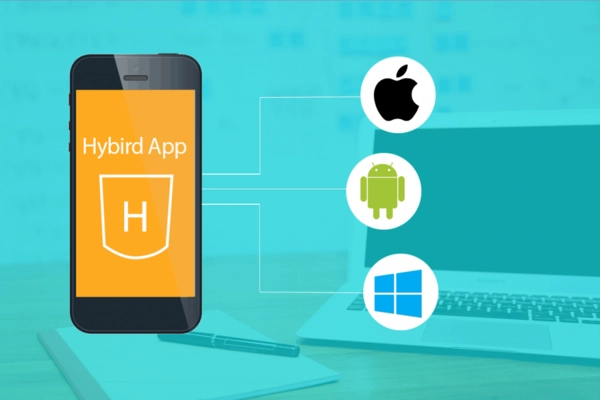
Definition of Hybrid App
A Hybrid App is essentially a web application wrapped inside a “Native Container.” When users download it from the App Store or Google Play, it looks like any other app, but the content inside is displayed through a WebView.
The Origin and Growth of Hybrid Apps
The explosion of Hybrid Apps stems from the business need for a rapid “Go-to-market” strategy. While Native Apps require specialized teams for each platform, Hybrid Apps allow businesses to leverage the abundant pool of web development talent, helping to lower the barriers to entry in the mobile app market.
How Hybrid Mobile Apps Work
To understand why a piece of web code can function smoothly on a phone, we need to examine its multi-layered structure. This mechanism is not merely displaying a website; it is a complex interaction between the source code and the device hardware.
The Native Container
This shell acts as a bridge. It is an ultra-lightweight native application whose sole task is to open an internal browser (WebView) to load the web application. This allows the app to be installed and have an icon on the home screen, just like any regular app.
The Role of WebView
WebView is the “heart” of a hybrid application. It acts as a window to display the User Interface (UI). Every interaction, such as swiping, touching, or pressing buttons, is processed inside this WebView using JavaScript.
The JavaScript Bridge
This is the most critical part that distinguishes a Hybrid App from a standard mobile website. Through frameworks such as React Native, Flutter, or Capacitor, JavaScript can “communicate” with the operating system’s APIs to access the Camera, GPS, Contacts, or Push Notifications.
Pros and Cons of Hybrid Mobile Applications
Every technology has two sides. Choosing to develop a hybrid mobile application requires managers to clearly understand the value gained and the technical trade-offs to have an appropriate development strategy.
Key Advantages
- Cost Savings: Only one development team is needed instead of two (iOS & Android).
- Easy Maintenance: When features need updating, you only need to modify the source code once and push it to the server.
- Scalability: Easily deploy across multiple different platforms without having to rewrite from scratch.
Disadvantages to Consider
- Performance: Because it must run through an intermediary layer (WebView/Bridge), Hybrid Apps are usually not as fast as Native Apps for heavy graphic processing tasks or games.
- User Experience (UX): Sometimes the interface does not achieve 100% smoothness compared to the operating system’s native UI components.
- Framework Dependency: If the framework you choose stops being supported or is slow to update when new iOS/Android versions are released, your application will face difficulties.
Comparison with Native Apps and Web Apps
To get an objective perspective, we need to weigh Hybrid Apps against two direct rivals: Native Apps (pure native applications) and Web Apps. Each type serves different strategic purposes.
General Comparison Table
| Feature | Native App | Hybrid App | Web App |
|---|---|---|---|
| Languages | Swift, Kotlin | JS, HTML, CSS | JS, HTML, CSS |
| Performance | Highest | Medium – Good | Low |
| Cost | Expensive | Cost-effective | Cheapest |
| Distribution | App Stores | App Stores | Browser |
Differences in Hardware Accessibility
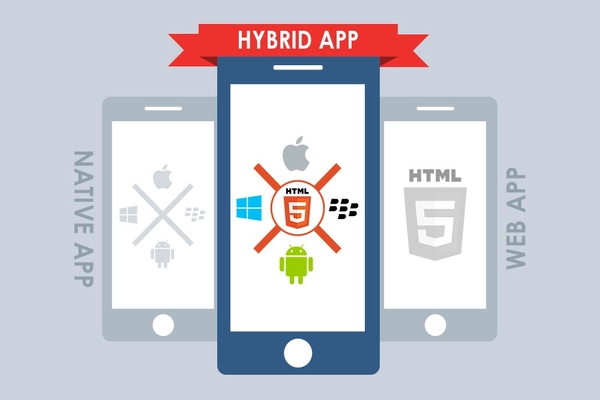
While Native Apps have the deepest and most optimized access to hardware, Web Apps are significantly limited by the browser. Hybrid Apps sit in the middle, providing fairly good hardware access through Plugins/Bridges, which is sufficient to meet 90% of the needs of today’s business applications.
Real-world Applications
You might be surprised to learn that many “billion-dollar” apps you use daily are actually built on the hybrid mobile app development model. This proves that if well-optimized, Hybrid Apps are fully capable of serving millions of users.
Typical Examples
- Instagram: Uses React Native to optimize feature development across both platforms simultaneously.
- Gmail: A classic example of using WebView to synchronize massive email content from the web to mobile.
- Evernote: Switching to a Hybrid model helped them maintain feature consistency across all devices.
Most Suitable Fields
Hybrid Apps are extremely successful in sectors such as E-commerce, Content Management apps (News), Social Networks, and internal enterprise applications (mobile ERP/CRM).
When to Develop a Hybrid App
Hybrid Apps are not always the number one choice. The decision of whether or not to develop a hybrid mobile app depends on your business goals, budget, and target audience at each specific stage.
Prioritize Hybrid Apps when…
- You need to build an MVP (Minimum Viable Product) to test the market in the shortest time possible.
- The budget is limited, but you want to reach users on both the App Store and Google Play.
- The application primarily displays content and information and does not require complex graphical calculations.
Avoid Hybrid Apps when…
- You are building a high-end 3D game or professional video editing application.
- Security requirements are at the highest level of the operating system.
- An ultra-responsive touch-and-swipe experience is a vital factor for the product.
The Future of Hybrid Mobile Applications
The evolution of technology never stops. With the emergence of next-generation frameworks, the boundary between Hybrid and Native is gradually blurring. The future of the hybrid mobile app development industry promises breakthroughs in both speed and experience.
The Rise of Flutter and React Native
These two “giants” are changing the definition of Hybrid. Instead of relying entirely on WebView, they use their own rendering engines or convert JavaScript code into native components, allowing performance to reach levels nearly equivalent to Native Apps.
PWA (Progressive Web Apps) Trends
PWAs are becoming more closely integrated with the Hybrid model. In the future, the disappearance of the boundary between browsers and applications will make hybrid development more popular and powerful than ever.
Frequently Asked Questions (FAQ)
To conclude the article, we have summarized the most common concerns of businesses and developers when beginning to explore the roadmap for hybrid mobile app development.
Are Hybrid Apps secure? Yes. The security level of a Hybrid App depends on your programming practices and the security of the framework used. If implemented correctly with data encryption protocols, it is completely safe for users.
How much cheaper is Hybrid App development usually? Typically, you can save between 30% and 50% in costs compared to developing two separate Native applications for iOS and Android.
Can I switch from Hybrid to Native later? Absolutely. Many startups begin with Hybrid to save costs; once they have a large user base and stable revenue, they invest in rewriting the app as Native to achieve maximum performance optimization.
Developing hybrid mobile applications is a smart strategic move for those looking to balance economic efficiency with market reach. With strong support from the community and technology, Hybrid Apps will undoubtedly remain a “star” in the mobile technology world for many years to come.
